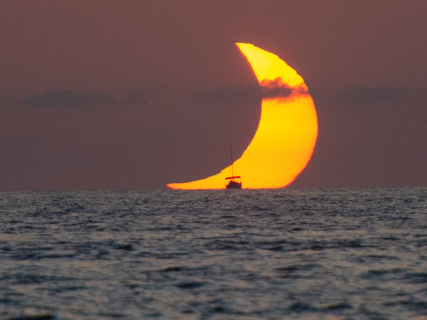

The lunar eclipse of August 28, 2026 will be visible from all of Spain and can be photographed with a mobile phone without the need to use special filters. However, getting the Moon to show detail and not appear as a white circle requires controlling the exposure, stabilizing the phone, and knowing the limitations of the zoom of each device.
The phenomenon will be a partial eclipse of magnitude 0.93, according to the National Geographic Institute (IGN). The partial phase can be observed from all of Spain, although in the center and east of the peninsula, the Balearic Islands, and Melilla the Moon will set before that phase has ended.
Photographing it does not require professional equipment. NASA points out that the Moon is one of the most accessible astronomical objects to start photography with a phone, but recommends stabilizing the device, controlling the exposure, and taking numerous photographs to increase the chances of getting a good shot.
You don't need any filter to photograph the lunar eclipse
This is one of the main differences compared to the solar eclipse of August 12.
A lunar eclipse can be observed directly and photographed without solar filters. The IGN specifies that observing it with the naked eye is not dangerous and does not require any special instrument.
Therefore, there is no need to place approved glasses or the necessary filters in front of the camera to photograph a solar eclipse.
Use a tripod or support the mobile
The first enemy will be movement.
NASA recommends stabilizing the phone with a tripod to obtain sharper images, especially in low light conditions. If one is not available, the device can be supported on a firm surface that allows maintaining the framing.
It is also useful to activate the camera timer. A delay of a few seconds prevents the small vibration caused by pressing the shutter button from affecting the photograph.
This precaution becomes even more important if a long focal length or the phone's zoom is used.
Tap on the Moon and lower the exposure
One of the most common mistakes when photographing the Moon is to obtain a completely white disk with no detail.
The reason lies in the enormous difference in brightness between the Moon and the dark sky surrounding it. The phone may try to illuminate the entire scene and end up overexposing precisely the object we want to photograph.
The recommendation from NASA is simple: tap on the Moon on the screen to focus and then reduce the brightness or exposure to recover details of the lunar surface. The goal is for the Moon to stop appearing white and burned and for its light and dark areas to start being distinguished.
On many mobile phones, it is enough to tap the Moon and slide down the exposure control that appears next to the focus point.
Lock the focus if your mobile allows it
Automatic focus can become another problem during a night photograph.
If the phone tries to focus constantly, it may lose the correct point just when the photograph is taken. NASA recommends fixing and locking the focus on a distant object, preferably the Moon itself when the device allows it.
Mobile phones that offer a professional or manual mode allow for greater control over this parameter.
Before the eclipse, it is useful to try the procedure by photographing the Moon during the previous nights. This way, you can check where the controls are and avoid learning to use them when the phenomenon is already underway.
If you have Pro mode, start with low ISO
Phones with manual controls allow adjusting parameters such as ISO and shutter speed.
Even though we are photographing at night, the Moon is a very bright object because it reflects sunlight. Therefore, NASA recommends low ISO when possible and starting with a fast shutter speed, adjusting it later according to the result obtained.
There is no single valid setting for all mobiles and for all phases of the eclipse. The brightness of the Moon will change during the phenomenon, and each phone processes images differently.
The most effective thing will be to take a test photograph, check if it retains detail, and correct the exposure.
Beware of digital zoom
The Moon appears much larger when we observe it directly than when it appears on a phone screen.
The usual reaction is to zoom in to the maximum, but this can considerably worsen the result. Not all zooms that a mobile shows are optical.
NASA warns that some phones have true optical zoom while others resort to digital zoom, which basically crops the image. In the latter case, it may be preferable to take the photograph with less zoom and crop it later.
If the phone has an optical telephoto lens, that camera will normally be the most interesting option to make the Moon occupy a larger part of the frame.
Don't try to make all the photos close-ups
A mobile phone has physical limits that become especially evident when trying to photograph an object located about 384,000 kilometers away.
If the camera does not have a powerful telephoto lens, a more effective strategy is to integrate the Moon into the landscape.
Buildings, mountains, trees, or monuments can provide scale and context. NASA itself recommends taking advantage of foreground elements when the available equipment does not allow for capturing great details of the lunar surface.
This can be especially interesting during the early morning of August 28, as the eclipse will occur with the Moon approaching the horizon before setting from Spain.
Take many photographs during the eclipse
It is not advisable to bet everything on a single shot.
Atmospheric turbulence, a small vibration, or a focus error can ruin a photograph even if the settings are correct. NASA recommends taking many images and then selecting the sharpest ones, a strategy known in astrophotography as lucky imaging.
It will also allow recording how the appearance of the Moon changes as the Earth's shadow advances.
If the phone is kept exactly in the same position on a tripod, photographs taken at different times can later serve to show the evolution of the eclipse in a sequence.
The mistakes that can ruin the eclipse photo
There are several especially common mistakes when photographing the Moon with a phone:
- Leaving the automatic exposure too high, causing the Moon to appear completely white.
- Using too much digital zoom, losing sharpness and detail.
- Photographing while holding the phone by hand when using high magnifications.
- Relying solely on autofocus in a practically dark scene.
- Using the flash, which does not contribute anything to illuminate an object located hundreds of thousands of kilometers away.
- Taking a single photograph and not checking the result while adjustments can still be modified.
NASA specifically recommends turning off the flash, focusing on the Moon, reducing brightness, and using the timer to avoid movement when shooting.
What time to photograph the eclipse on August 28
The partial eclipse will occur during the early morning of Friday, August 28 and will be visible from all of Spain.
The specific situation will depend on the location. The IGN offers a tool to consult the evolution and schedules of the eclipse from each provincial capital, as the setting of the Moon will determine how much can be observed from each territory.
In the central and eastern peninsula, Balearic Islands, and Melilla, the Moon will hide while it is still in partial phase. In the western peninsula, Canary Islands, and Ceuta, the setting will take place after that phase ends.
To prepare a specific photograph, it will be important to check in advance the direction in which the Moon will set from the chosen location and look for a clear horizon.